> ## Documentation Index
> Fetch the complete documentation index at: https://docs.freyavoice.ai/llms.txt
> Use this file to discover all available pages before exploring further.
# Inbound Calls
> Handling, optimizing, and managing inbound call processing in Freyavoice AI
## Inbound Call Processing
Inbound calls are calls that customers or users initiate to your phone numbers. These are typically support calls, sales inquiries, appointment requests, or other customer-initiated interactions.
## Inbound Call Flow
### Call Reception
**Number Identification**: When a call arrives, Freyavoice AI identifies which phone number received it.
**Number Resolution**: The system looks up the configuration for that number to determine routing.
**Session Creation**: A new call session is created with a unique call ID for tracking.
**Context Loading**: Any relevant context (customer data, previous interactions) is loaded.
### Routing
**Agent Routing**: If configured with an agent, the call is routed directly to that agent.
**Workflow Routing**: If configured with a workflow, the workflow engine processes the call.
**Conditional Routing**: Workflows can route based on conditions like time of day, caller ID, or other factors.
**Fallback Routing**: If primary routing fails, fallback paths are used.
### Processing
**Agent Activation**: The agent loads its configuration, system prompt, and functions.
**Conversation Start**: The agent greets the caller and begins the conversation.
**Real-Time Processing**: The agent processes each turn of conversation in real-time.
**Function Execution**: Functions are called as needed to fetch data or perform actions.
**Context Management**: Conversation context is maintained throughout the call.
### Completion
**Call End**: The call ends when either party hangs up or the conversation completes.
**Data Storage**: Call data, transcript, and metadata are stored.
**Webhooks**: Webhook events are sent for call completion.
**Analytics**: Call data is processed for analytics and reporting.
## Optimizing Inbound Calls
### Response Time
**Fast Connection**: Minimize time between call arrival and agent response.
**Quick Greeting**: Agents should greet callers quickly to avoid silence.
**Efficient Processing**: Optimize agent prompts and functions for speed.
**Reduced Latency**: Monitor and optimize latency throughout the call flow.
### Call Quality
**Audio Optimization**: Ensure high-quality audio for clear communication.
**Network Quality**: Monitor network conditions and optimize for quality.
**Codec Selection**: Use appropriate codecs for best quality and efficiency.
**Echo Handling**: Proper echo cancellation for better call experience.
### User Experience
**Clear Communication**: Ensure agents speak clearly and are easy to understand.
**Helpful Responses**: Agents should provide helpful, accurate responses.
**Efficient Resolution**: Resolve caller needs quickly and effectively.
**Professional Service**: Maintain professional tone and service quality.
## Inbound Call Scenarios
### Customer Support
**Issue Resolution**: Help customers resolve problems or answer questions.
**Product Information**: Provide information about products or services.
**Account Management**: Help with account-related inquiries.
**Technical Support**: Provide technical assistance and troubleshooting.
### Sales Inquiries
**Product Information**: Answer questions about products or services.
**Pricing**: Provide pricing information and quotes.
**Lead Qualification**: Qualify leads and gather information.
**Appointment Scheduling**: Schedule sales meetings or demos.
### Appointment Management
**Scheduling**: Help customers schedule appointments.
**Reminders**: Send appointment reminders (if integrated).
**Rescheduling**: Allow customers to reschedule appointments.
**Cancellations**: Handle appointment cancellations.
### Information Services
**Hours and Location**: Provide business hours and location information.
**General Information**: Answer general questions about your business.
**Directory Services**: Help callers find specific information or departments.
## Best Practices
### Preparation
**Test Before Launch**: Always test inbound call handling before going live.
**Monitor First Calls**: Closely monitor the first real calls to catch issues.
**Have Fallbacks**: Plan fallback strategies for when things go wrong.
**Document Processes**: Document your inbound call handling processes.
### Optimization
**Analyze Performance**: Regularly analyze call performance and identify improvements.
**Iterate on Prompts**: Continuously improve agent prompts based on real conversations.
**Optimize Routing**: Refine routing logic based on call patterns and outcomes.
**Improve Functions**: Optimize functions for speed and reliability.
### Monitoring
**Track Metrics**: Monitor key metrics like call volume, duration, and success rates.
**Review Transcripts**: Regularly review call transcripts to identify issues.
**User Feedback**: Collect and act on user feedback about call experiences.
**Error Tracking**: Monitor and address errors promptly.
## Troubleshooting
### Common Issues
**Calls Not Connecting**: Check number configuration, provider connection, and routing setup.
**Poor Audio Quality**: Verify network connectivity, codec settings, and provider quality.
**Agent Not Responding**: Check agent configuration, system prompt, and model settings.
**Slow Response Times**: Optimize prompts, reduce function call times, and check system load.
### Debugging
**Call Logs**: Review call logs to identify issues and patterns.
**Provider Logs**: Check provider-side logs for telephony issues.
**Agent Logs**: Review agent execution logs for processing issues.
**Network Diagnostics**: Check network connectivity and quality.
## Provider Setup Guides
Once you've added a phone number to Freya and assigned an inbound agent, you need to configure your telephony provider to forward calls to Freya's SIP endpoint. The steps vary by provider — follow the guide for yours below.
### Twilio
Twilio is the most common provider used with Freya. Setup takes under a minute:
1. Log in to the [Twilio Console](https://console.twilio.com) and navigate to **Phone Numbers** > **Manage** > **Active Numbers**
2. Click the phone number you want to connect to Freya
3. Scroll down to the **Voice Configuration** section
4. Under **"A call comes in"**, set the dropdown to **Webhook** and paste the following URL:
```
https://agents-eu1.freyavoice.ai/telephony/inbound/webhook
```
5. Make sure the method is set to **HTTP POST**
6. Click **Save configuration**
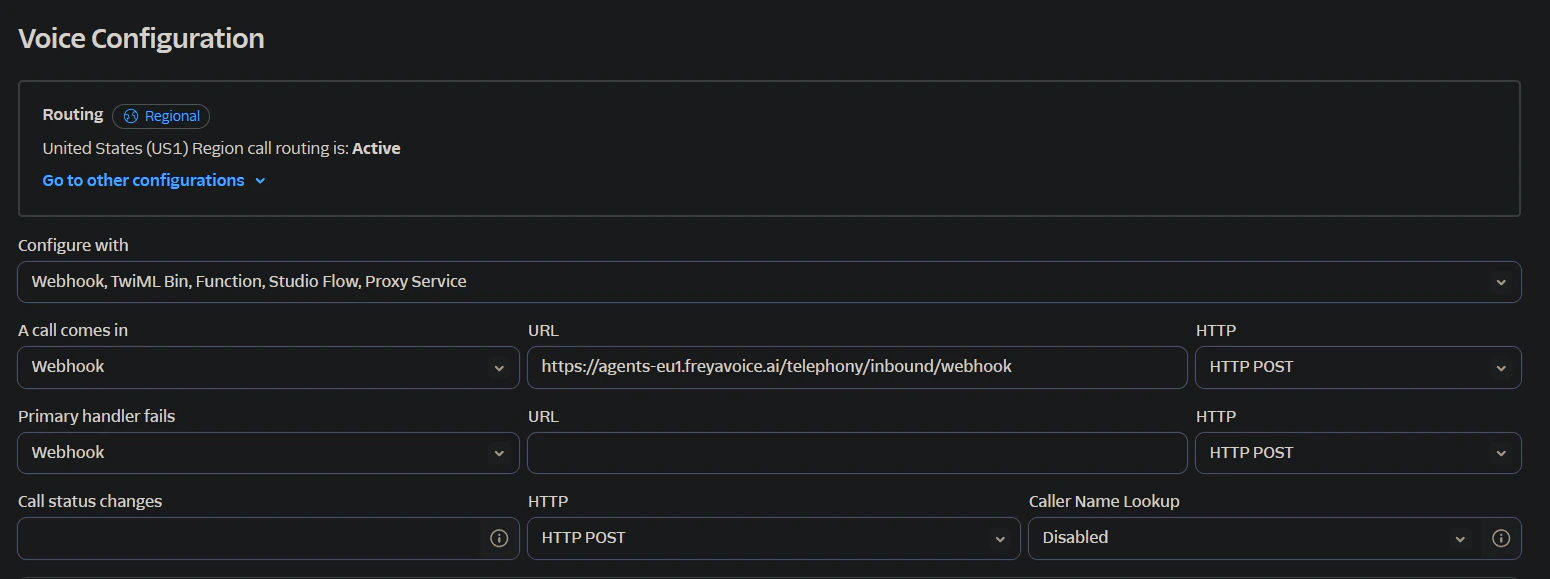 That's it. Every call to this Twilio number will now be forwarded to Freya, which routes it to the inbound agent you've configured on the [Phone Numbers](/guides/fundamentals/phone-numbers) page.
## Next Steps
Learn how to initiate and manage outbound calling operations.
That's it. Every call to this Twilio number will now be forwarded to Freya, which routes it to the inbound agent you've configured on the [Phone Numbers](/guides/fundamentals/phone-numbers) page.
## Next Steps
Learn how to initiate and manage outbound calling operations.